How to Use GCash in Casino Plus
Using GCash to fund your Casino Plus account offers an efficient and secure way to enhance your online gaming experience. As one of the most popular mobile wallets in the Philippines, GCash is widely accepted for deposits and withdrawals in various online casinos, including Casino Plus.
This guide will provide detailed instructions for using GCash in Casino Plus, discuss its benefits, and offer tips for smooth transactions.
Why Use GCash for Online Gambling?
GCash has become a preferred payment method for many online gamblers in the Philippines due to several reasons. First, it offers fast and easy transactions, allowing users to make quick deposits and withdrawals, meaning you can start playing or cash out your winnings almost instantly.
Additionally, GCash is highly accessible; it can be used via mobile phones, making it convenient even for those who don’t have a bank account. It is also widely accepted by various online casinos, making it a versatile payment solution for platforms like Casino Plus.
Furthermore, GCash ensures secure payments with features such as fingerprint authentication, PIN protection, and SMS alerts for each transaction, making it a safe option for handling real money online. Its 24/7 availability is another advantage, allowing access to services at any time, which is beneficial for players who prefer gambling outside regular banking hours.
Moreover, some online casinos, including Casino Plus, may offer exclusive bonuses or promotions for players who deposit via GCash, adding more appeal to this payment option.
With these benefits in mind, the following sections will guide you through setting up your GCash account and linking it to your Casino Plus account.
How to Set Up a GCash Account
To use GCash in Casino Plus, you must first set up and verify your GCash account. To get started, download the GCash app from the App Store or Google Play Store, ensuring you download the official app to avoid security risks.
After installing the app, open it and enter your active mobile number. Note that GCash requires a Filipino mobile number to complete the registration process. You will then need to provide the necessary information, including your name, address, email, and other personal details. It’s essential to provide accurate information to avoid verification issues later. Next, set a secure PIN for your GCash account, which will be used to authorize transactions and log in to your account.
To fully access GCash’s services, you need to verify your account. Verification unlocks all features, including higher transaction limits and withdrawal ability. Go to the “Verify Now” option in the app and prepare a valid government-issued ID such as a driver’s license, passport, or UMID. Follow the app’s instructions to take photos of your ID and a selfie for facial verification. The verification process can take a few minutes to a few hours, after which you will receive a confirmation SMS if successful.
How to Deposit Funds into Casino Plus Using GCash
Once your GCash account is set up, you can deposit funds into your Casino Plus account. To start, log in to Casino Plus by visiting their website and entering your username and password. If you’re a new user, you must register for an account by providing personal details, an email address, and setting a password. You may also be required to verify your identity by submitting documents like a government-issued ID and proof of address.
After logging in, locate the “Deposit” or “Cashier” section in your account dashboard. This section will show you a list of available payment methods for deposits. Choose GCash from the list of options. You’ll be redirected to a page where you can enter the deposit amount. Ensure that the amount you enter is within the minimum and maximum deposit limits set by Casino Plus, which typically starts at ₱100 for GCash deposits.
Once you’ve specified the amount, you must authorize the transaction. You may be prompted to log in to your GCash account, enter your PIN, or use biometric authentication to complete the transaction. After authorization, the funds should be credited to your Casino Plus account within a few minutes, allowing you to explore the available games, including slots, live casino games, and sports betting.
If you encounter any issues during the deposit process, Casino Plus provides customer support, which can be reached through live chat or email for assistance.
How to Withdraw Winnings from Casino Plus Using GCash
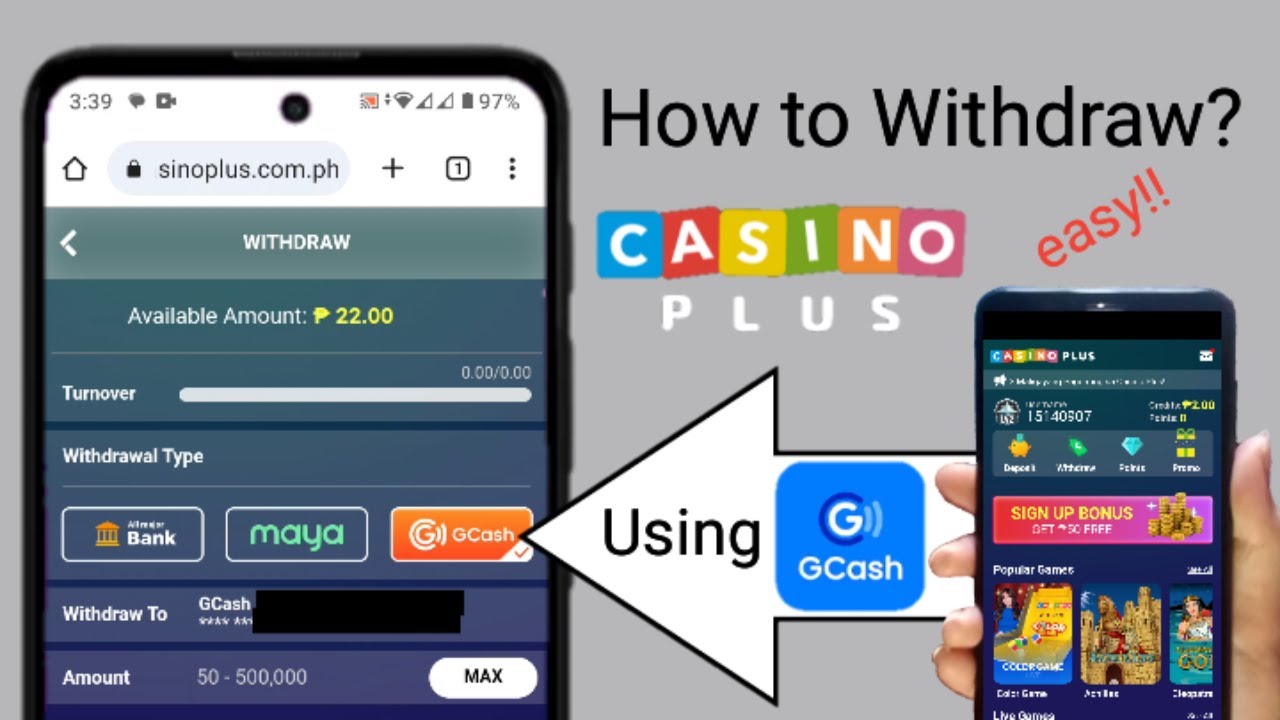
Withdrawing your winnings using GCash is straightforward. To initiate a withdrawal, log in to your Casino Plus account and go to the “Withdrawal” section, usually located in your account dashboard’s “Cashier” area.
After accessing the withdrawal section, select GCash as your preferred withdrawal method. Note that some casinos require you to use the same payment method for withdrawals you used for deposits. Once you’ve selected GCash, enter the amount you wish to withdraw from your Casino Plus account. Ensure you meet all withdrawal requirements, such as completing any wagering requirements if you used a bonus. The minimum withdrawal limit varies but generally starts at ₱500 for GCash.
Follow the prompts to confirm your withdrawal request. You may need to enter your GCash PIN to authorize the transaction. Processing times for GCash withdrawals can vary; some withdrawals may be processed instantly, while others can take up to 24 hours, depending on Casino Plus’s policies.
Once your withdrawal is successful, the amount will be reflected in your GCash balance, and you will receive an SMS notification from GCash confirming the receipt of funds.
Tips for Successful Transactions with GCash in Casino Plus
Ensure that your GCash account is adequately funded before making a deposit to avoid interruptions. You can top up your GCash account through bank transfers, over-the-counter partners, or remittance centers. Keep an eye on transaction limits, as GCash has limits based on your verification level. Fully verified accounts have higher transaction limits compared to partially verified accounts, so consider this if you plan to make larger transactions.
Each online casino, including Casino Plus, has specific payment policies. Familiarize yourself with Casino Plus’s rules to avoid potential delays or complications. Some online casinos offer exclusive promotions for GCash users, so check Casino Plus’s promotions page regularly to maximize your rewards.
Be aware that while most GCash transactions are free, some online casinos may charge a small fee for withdrawals. Always review the terms and conditions of Casino Plus to understand any applicable fees. To maintain account security, always log out of both your GCash and Casino Plus accounts after completing transactions, especially when using shared devices.
Use GCash in Casino Plus

Using GCash in Casino Plus is fast, secure, and convenient, making it an excellent choice for managing your funds on the platform. With GCash, you can make instant deposits, withdraw your winnings with ease, and benefit from exclusive promotions designed for GCash users, especially those who enjoy Filipino games such as Color Game. By following this guide, you’ll be well-equipped to handle transactions smoothly and enjoy a hassle-free gaming experience at Casino Plus.
With its strong security features, seamless transactions, and wide acceptance in the Philippines, GCash is an ideal payment solution for Casino Plus users. Whether you are a seasoned player or new to online gambling, this payment method ensures a safe and enjoyable experience. Stay aware of transaction limits, verify your accounts for increased functionality, and keep an eye out for bonuses to maximize your gaming time.

Hristo (Christo to his friends) is a seasoned iGaming professional with 18 years experience building iGaming & Fintech products – Casino, Sportbook, Poker, Bingo, Social gaming and Fintech products gathered throughout his career in PokerStars, Winner.com, Playtech, Reflex Gaming. Strong knowledge and expertise in Marketing, Operations, Strategy building and business relationship management.